
AI Receptionist

Your front desk, answering on every channel at once.

Customers message when it suits them — late at night, mid-shift, from five different apps. The AI Receptionist replies in seconds on all of them, answers from what you have told it about your business, books the appointment, and passes the conversation to your team when it should.

Channels, one inbox
5Channels, one inbox
Answering, including out of hours
24/7Answering, including out of hours
To a first reply
SecondsTo a first reply
9:41
WhatsAppNew messageAI
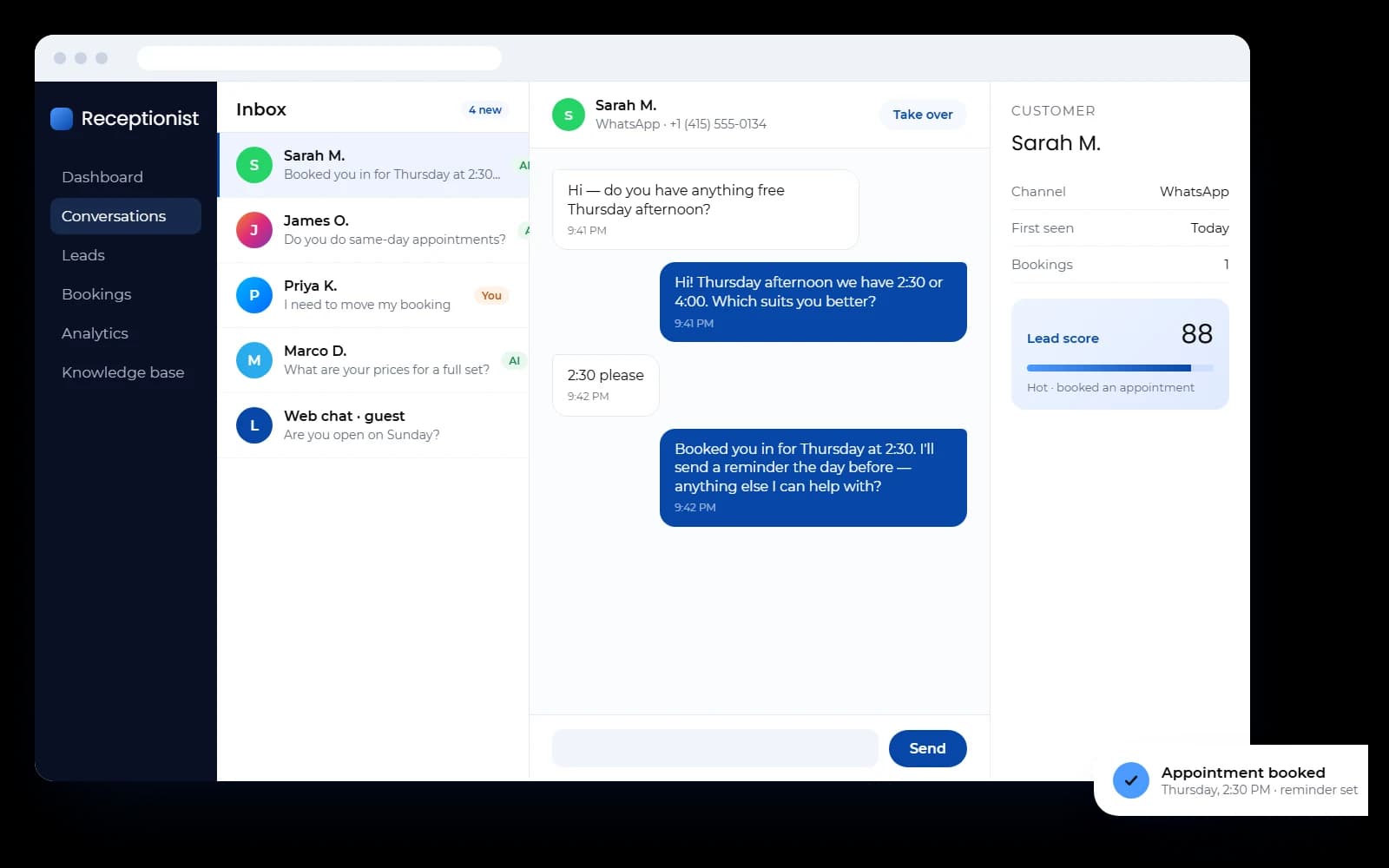
  1. Any free slots Thursday?9:41 PM
  2. Hi! Thursday afternoon we have 2:30 or 4:00. Which suits you better?9:41 PM
  3. 2:30 please9:42 PM
  4. Booked you in for Thursday at 2:30. I'll send a reminder the day before — anything else I can help with?9:42 PM
  5. Appointment bookedThursday, 2:30 PM · Confirmation sent · Reminder set

Channels

Wherever customers already message you

Connect the accounts you have. Each channel keeps its own connection and can have the AI switched on or off independently, so you can start with one and add the rest when you are ready.

  • WhatsAppReplies in the window, plus approved templates for outside it.
  • InstagramDirect messages answered from the same inbox.
  • MessengerFacebook page messages, handled the same way.
  • TelegramYour own bot, connected to the same assistant.
  • Web chatA chat widget you can embed on any page of your site.

What it does

A receptionist, not a chatbot

Answers from your business, not the internet

Upload your documents, point it at your website, or write FAQs yourself. Answers come from that knowledge base, and it is told to treat what it reads as information rather than instructions — so a page it scraped cannot talk it into going off script.
Books appointments into a real calendar

It checks live availability in your own time zone, offers slots that exist, and writes the booking. Every slot is re-checked on the server before anything is confirmed, so two customers cannot take the same time.

Captures and scores leads

Every conversation becomes a contact with a name, a channel and a history. Leads are scored hot, warm or cold as they go, with a record of why the score moved, and export to CSV when you want them elsewhere.

Hands over to your team

Anyone can take over a conversation mid-thread and hand it back to the AI afterwards. Conversations can be assigned, tagged, filtered by status, and carry internal notes only your team can see.

Follows up on quiet threads

Conversations that go silent get an automatic nudge, and appointments get reminders — both on a schedule you set, and both switchable per workspace.

Runs campaigns, not just replies

Send a broadcast across your connected channels, with WhatsApp message templates managed in the same place for messages sent outside the 24-hour window.

Shows you what is happening

Conversations over time, channel split, lead funnel, busiest hours, the questions customers ask most, and an AI-written summary of the period — exportable as a PDF report.

Tells you the moment it matters

Push notifications on web and Android, an in-app notification center, and alerts to a verified email address or WhatsApp number when a booking lands or a conversation is escalated.

The difference

The same Tuesday, twice

Nothing here is unusual. It is what happens between the messages arriving and somebody being free to answer them.

  • A message at 9pm

    With the AI ReceptionistAnswered in seconds, and booked if they are ready.

    Without itRead tomorrow, by which time they have called someone else.

  • Five channels at once

    With the AI ReceptionistOne inbox, one thread per customer, nothing missed.

    Without itFour apps, two phones, and whoever remembers to check.

  • The same question, again

    With the AI ReceptionistAnswered from your own information, the same way every time.

    Without itRetyped by whoever picks it up, slightly differently each time.

  • A booking request

    With the AI ReceptionistReal availability offered, the slot written into the calendar.

    Without itBack and forth until one of you stops replying.

  • Someone who needs a person

    With the AI ReceptionistEscalated, with the whole conversation already in front of you.

    Without itExplained from the start, again, to the next person.

How it works

Live in days, not months

We set the account up for you — there is no self-serve sign-up to work through, and no sales-engineering project either.

  1. 01

    Connect your channels

    We link the accounts you already use — WhatsApp, Instagram, Messenger, Telegram — and drop the chat widget on your site. Credentials are encrypted before they are stored.

  2. 02

    Teach it your business

    Your services, opening hours and prices, plus any documents, web pages or FAQs worth knowing. You set the assistant's tone, greeting and reply length, and what it should never say.

  3. 03

    Test it before anyone sees it

    A built-in simulator runs against the same AI as the live assistant, so you can try awkward questions and correct the answers before a customer ever asks.

  4. 04

    Go live, and watch the inbox

    The assistant answers, books and captures leads on its own. Your team sees every conversation in real time, takes over whenever they want to, and gets an alert when a customer needs a person.

Inside the app

The screens your team will live in

A responsive web app, installable on a phone, with a native Android build for push notifications on the move.

The conversations inbox: a channel sidebar, a list of customer threads, an open WhatsApp conversation where the assistant books an appointment, and a customer panel showing a lead score
  • Dashboard

    Today at a glance: activity, upcoming bookings, the KPIs that matter and how much of the month's usage is left.

  • Conversations

    A three-panel inbox — list, thread, customer — updating live, with typing indicators and takeover controls.

  • Leads

    A pipeline you can work as a board or a table, with filters, bulk actions and a full history per lead.

  • Bookings

    Calendar, list and availability views. Reschedule, cancel or remind, and manage the services you offer.

  • AI agent

    Personality, knowledge base, escalation rules, lead capture and the test simulator, each in its own tab.

  • Analytics

    The full picture over any date range, with a PDF export for the people who want it in a file.

Security

Built for other people's customer data

The assistant handles conversations, contact details and bookings, so the platform is built to keep each business's data to itself.

Separate workspace per business
Every record belongs to one workspace, every request is checked against it, and no query crosses the line.
Encrypted where it counts
Channel credentials, AI keys, mail passwords and two-factor secrets are encrypted at rest with AES-256-GCM.
Two-factor sign-in
Time-based codes from an authenticator app, with backup codes, on top of sessions that expire and rotate.
Roles and permissions
Owner, operations and customer roles out of the box, plus custom roles built from fifteen permission areas.
Rate limiting and validation
Sign-in attempts are throttled per address and every request is schema-validated before it reaches the database.
An audit trail
Administrative actions are logged, and the log survives even if the workspace it refers to is deleted.

Questions

AI Receptionist, answered

WhatsApp, Instagram, Messenger, Telegram and a web chat widget on your own site. They all feed one inbox, and you can turn the AI on or off per channel.

Have questions?

Discover the ideal solution for your needs today

Partner with Elevait Global Solutions for trusted digital services and payment solutions that help your business grow, increase efficiency, and boost sales.

Where we work
Serving the USA and Canada